> ## Documentation Index
> Fetch the complete documentation index at: https://docs.nomadsarc.app/llms.txt
> Use this file to discover all available pages before exploring further.

# How to Set Up BOGO Buy X Get Y Discounts in Shopify

> Create Buy X Get Y promotions using Slice 'n Save. Specify which products customers must buy and which they receive discounted, with flexible conditions.

<iframe src="https://drive.google.com/file/d/17C8HVLJ9Rj2jMvQ_xak2MgTPegfGywEl/preview" width="100%" height="500" allow="autoplay" />

The **BOGO (Buy X Get Y)** discount type in Slice 'n Save lets you create classic buy-one-get-one-style promotions — or any variation where buying certain products unlocks a discount on other products. You define the required "buy" products and quantities, the "get" products and their discount, and optionally layer in conditions for cart or customer eligibility.

<Warning>
  BOGO discounts require the **Plus** plan. Upgrade your plan from the Slice 'n Save app settings before setting up this discount type.
</Warning>

## Steps Guide

<Steps>
  <Step title="Create a new discount">
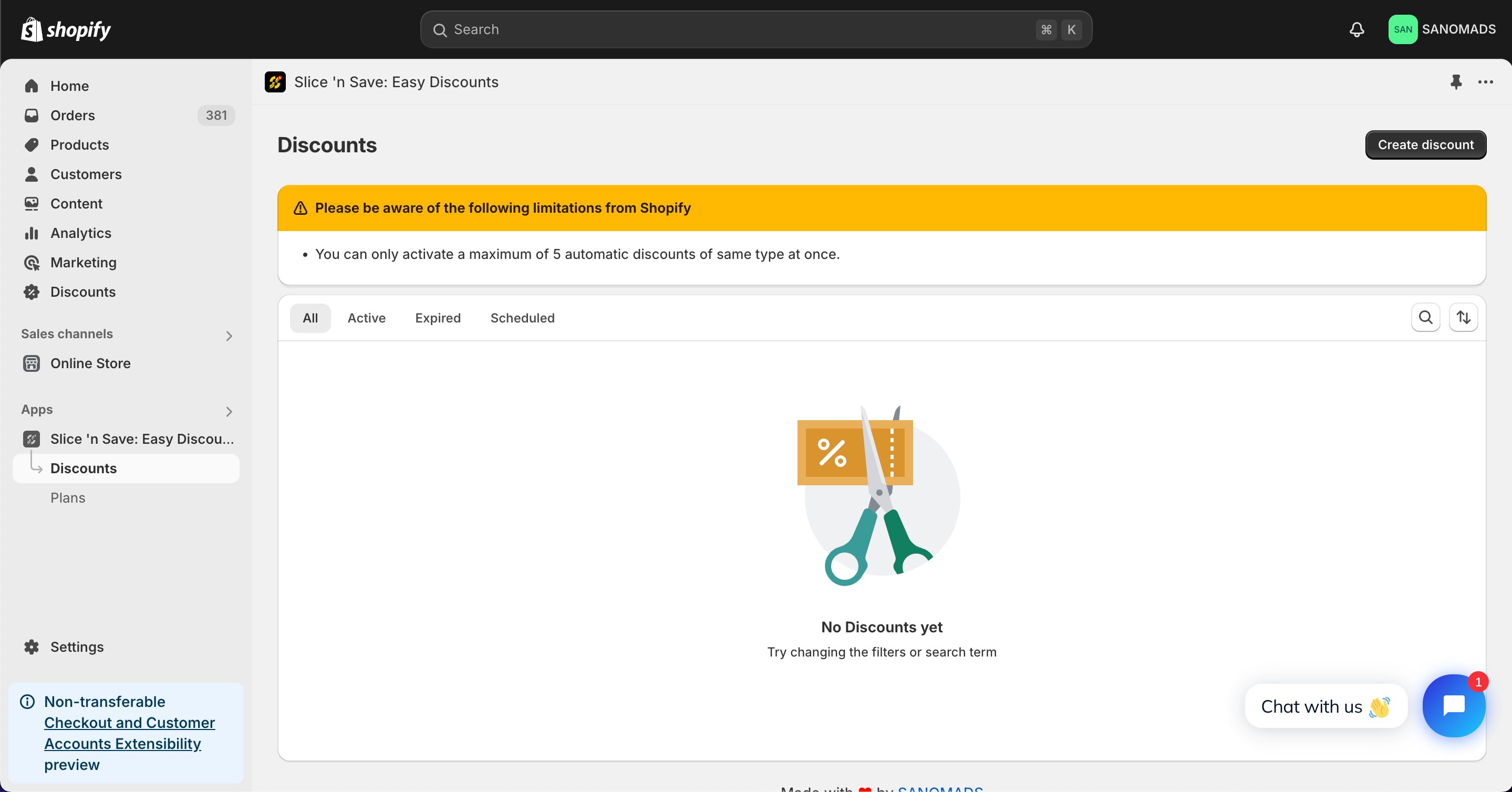
    Open the [Discounts](https://admin.shopify.com/apps/slice-n-save/discounts) section in the Slice 'n Save app and click **Create discount**.
    <Frame>
      <img src="https://mintcdn.com/nomads-arc/TuRE4lj597elb6gw/images/101c48b05e-82d9c0cf516f573a6bc2bbdb771d77d0.png?fit=max&auto=format&n=TuRE4lj597elb6gw&q=85&s=b23a37fbd7492cdcda3d7750316a96cb" alt="101c48b05e 82d9c0cf516f573a6bc2bbdb771d77d0" width="2878" height="1508" data-path="images/101c48b05e-82d9c0cf516f573a6bc2bbdb771d77d0.png" />
    </Frame>
  </Step>

  <Step title="Select the discount type">
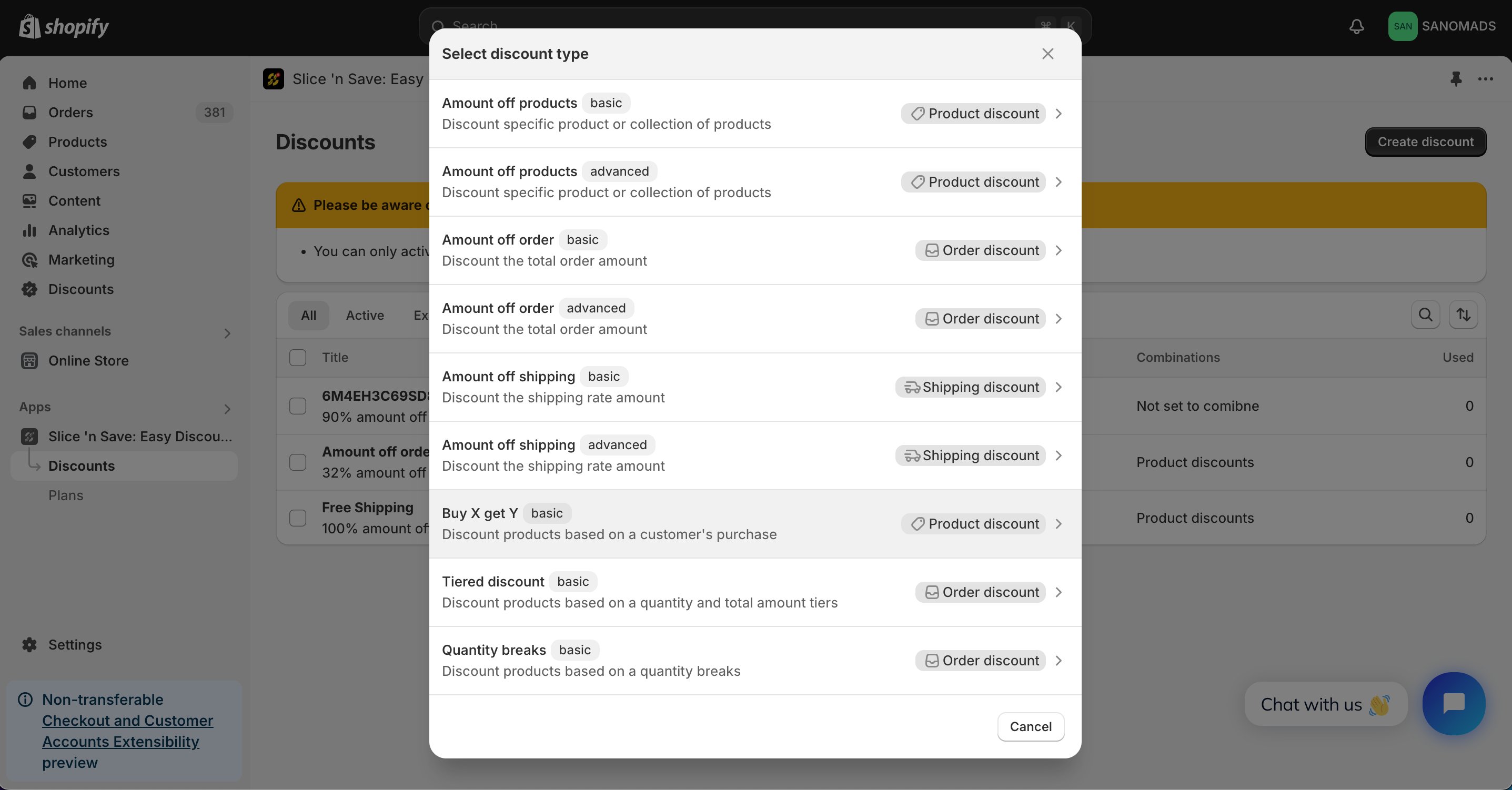
    Choose **Buy X get Y** from the list of discount types.
    <Frame>
      <img src="https://mintcdn.com/nomads-arc/TuRE4lj597elb6gw/images/ccad8075c5-a9c6731a71f92a487af3e9bd362d1a58.png?fit=max&auto=format&n=TuRE4lj597elb6gw&q=85&s=4a20fec9a12185446fc0ef25839cec8b" alt="Ccad8075c5 A9c6731a71f92a487af3e9bd362d1a58" width="2874" height="1502" data-path="images/ccad8075c5-a9c6731a71f92a487af3e9bd362d1a58.png" />
    </Frame>
  </Step>

  <Step title="Set the method and title">
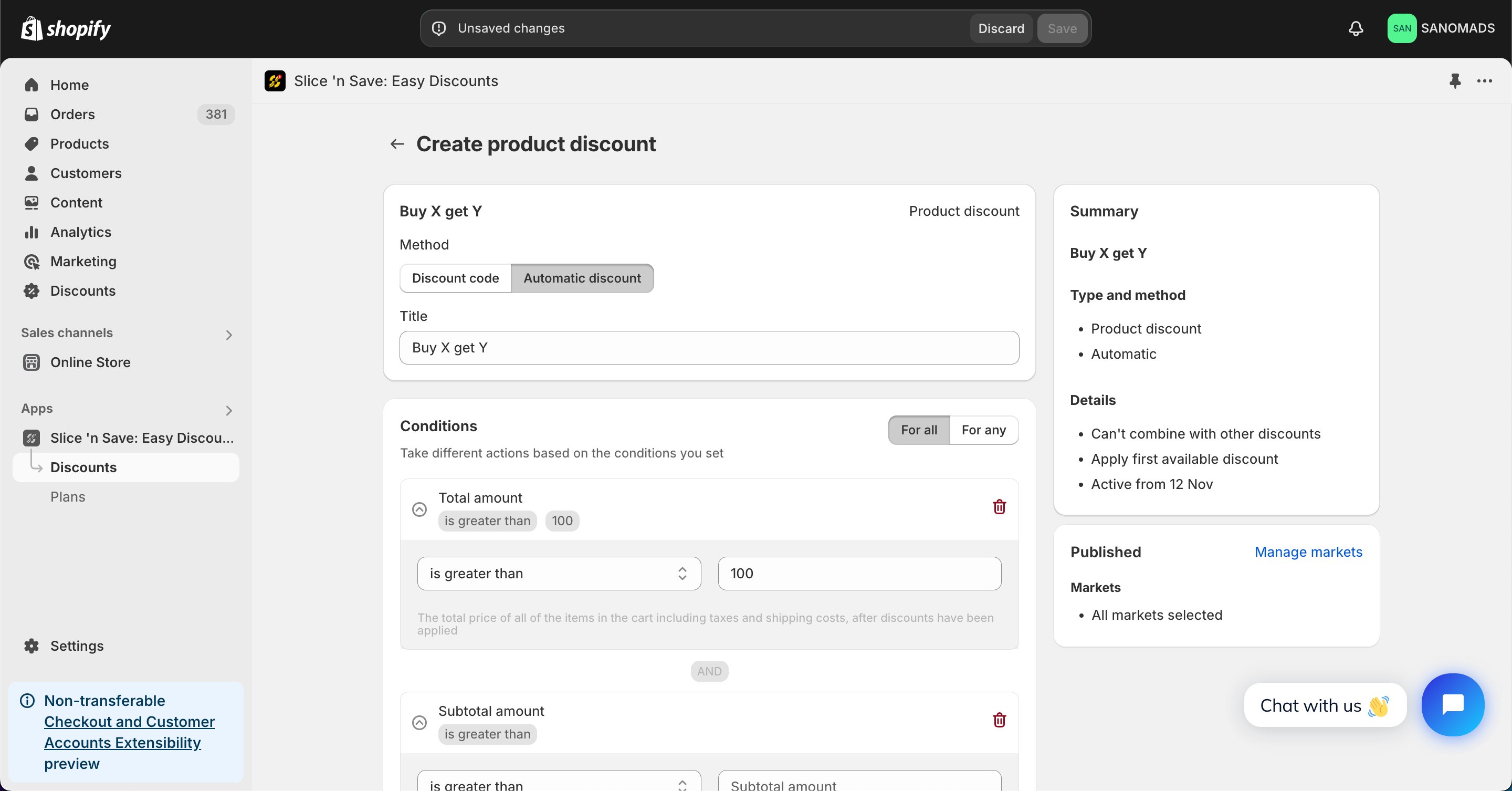
    Select the discount method and enter a title for the discount.
    <Frame>
      <img src="https://mintcdn.com/nomads-arc/TuRE4lj597elb6gw/images/b35e922458-9310c7974d804e1564c3d4936d118752.png?fit=max&auto=format&n=TuRE4lj597elb6gw&q=85&s=4de9b01a2c0db54dbc375a69d85997bf" alt="B35e922458 9310c7974d804e1564c3d4936d118752" width="2880" height="1506" data-path="images/b35e922458-9310c7974d804e1564c3d4936d118752.png" />
    </Frame>
  </Step>

  <Step title="Add conditions">
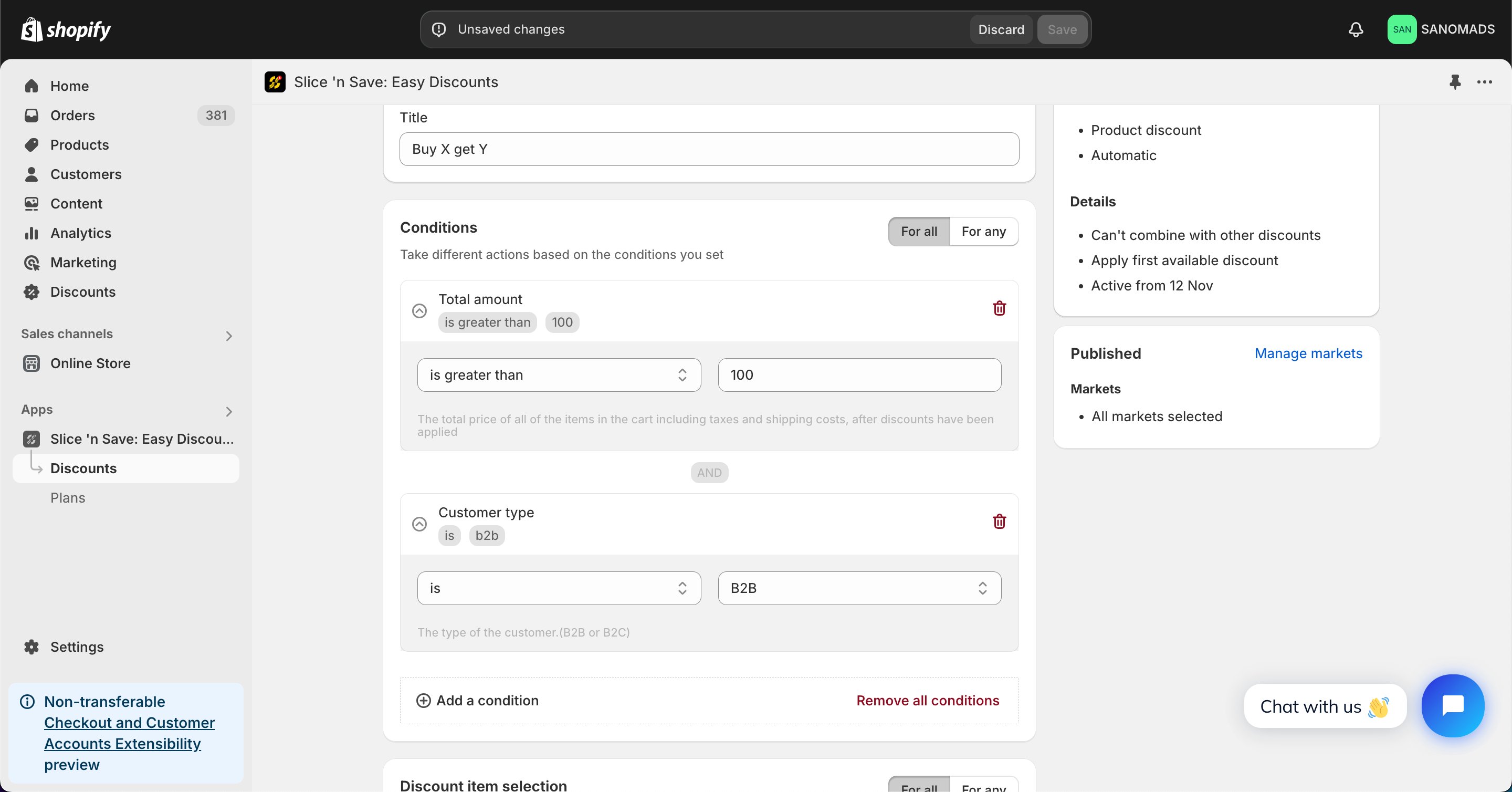
    Add one or more conditions to control when the BOGO discount is valid.
    <Frame>
      <img src="https://mintcdn.com/nomads-arc/TuRE4lj597elb6gw/images/1fae385d70-bc4485f97e9549f2f455174dd5ef6b47.png?fit=max&auto=format&n=TuRE4lj597elb6gw&q=85&s=ca1c4404211d5cb717fc2c94a72a671f" alt="1fae385d70 Bc4485f97e9549f2f455174dd5ef6b47" width="2880" height="1508" data-path="images/1fae385d70-bc4485f97e9549f2f455174dd5ef6b47.png" />
    </Frame>
  </Step>

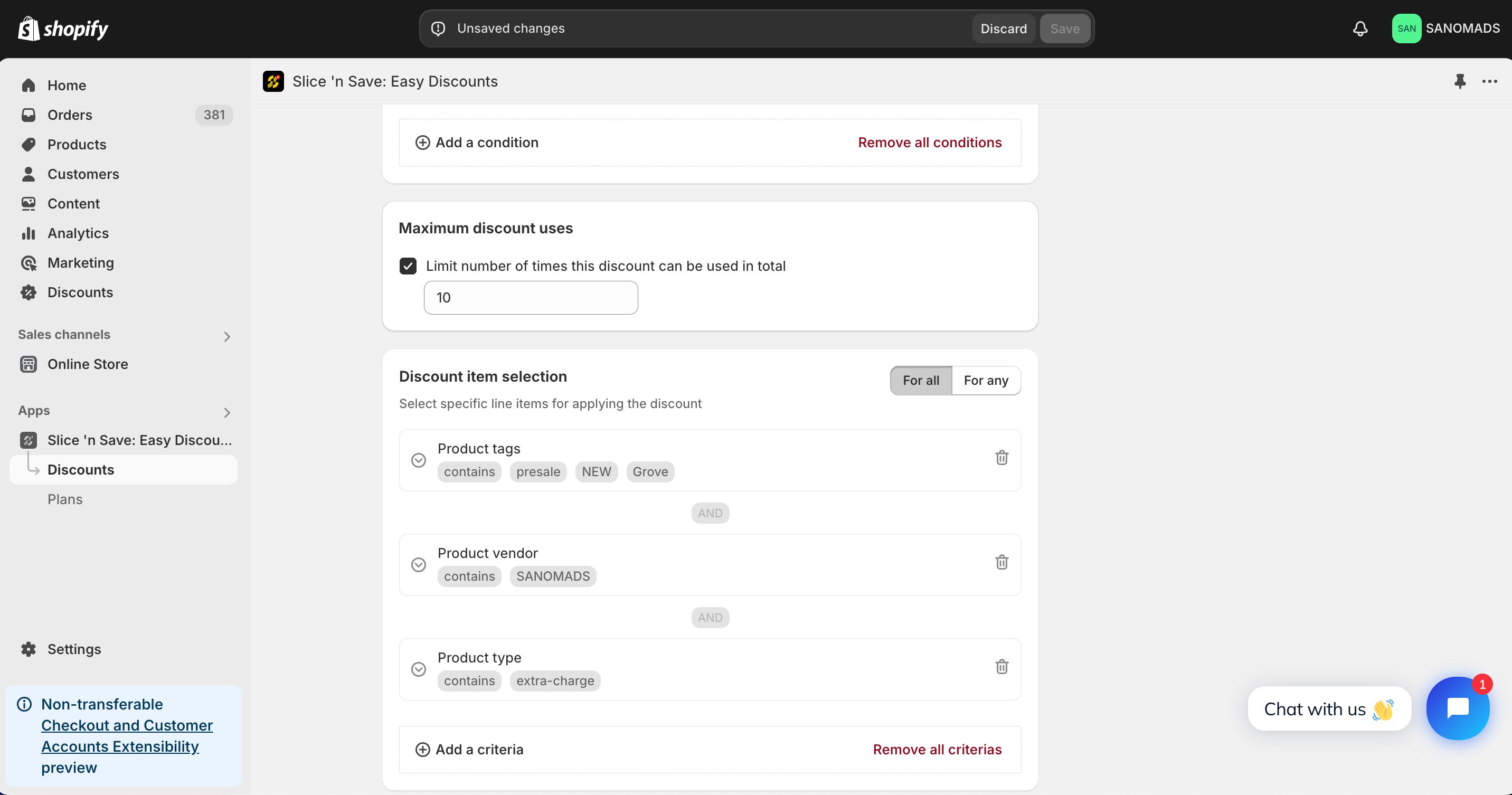
  <Step title="Add criteria">
    Add product-level criteria to filter which products qualify as the "buy" products.
    <Frame>
      <img src="https://mintcdn.com/nomads-arc/TuRE4lj597elb6gw/images/4ae40fb4af-c5afd0136e4ce1993bcac48508d8138d-1.png?fit=max&auto=format&n=TuRE4lj597elb6gw&q=85&s=2def0a15f1a9695e63234ccaeae1b1af" alt="4ae40fb4af C5afd0136e4ce1993bcac48508d8138d 1" width="2864" height="1506" data-path="images/4ae40fb4af-c5afd0136e4ce1993bcac48508d8138d-1.png" />
    </Frame>
  </Step>

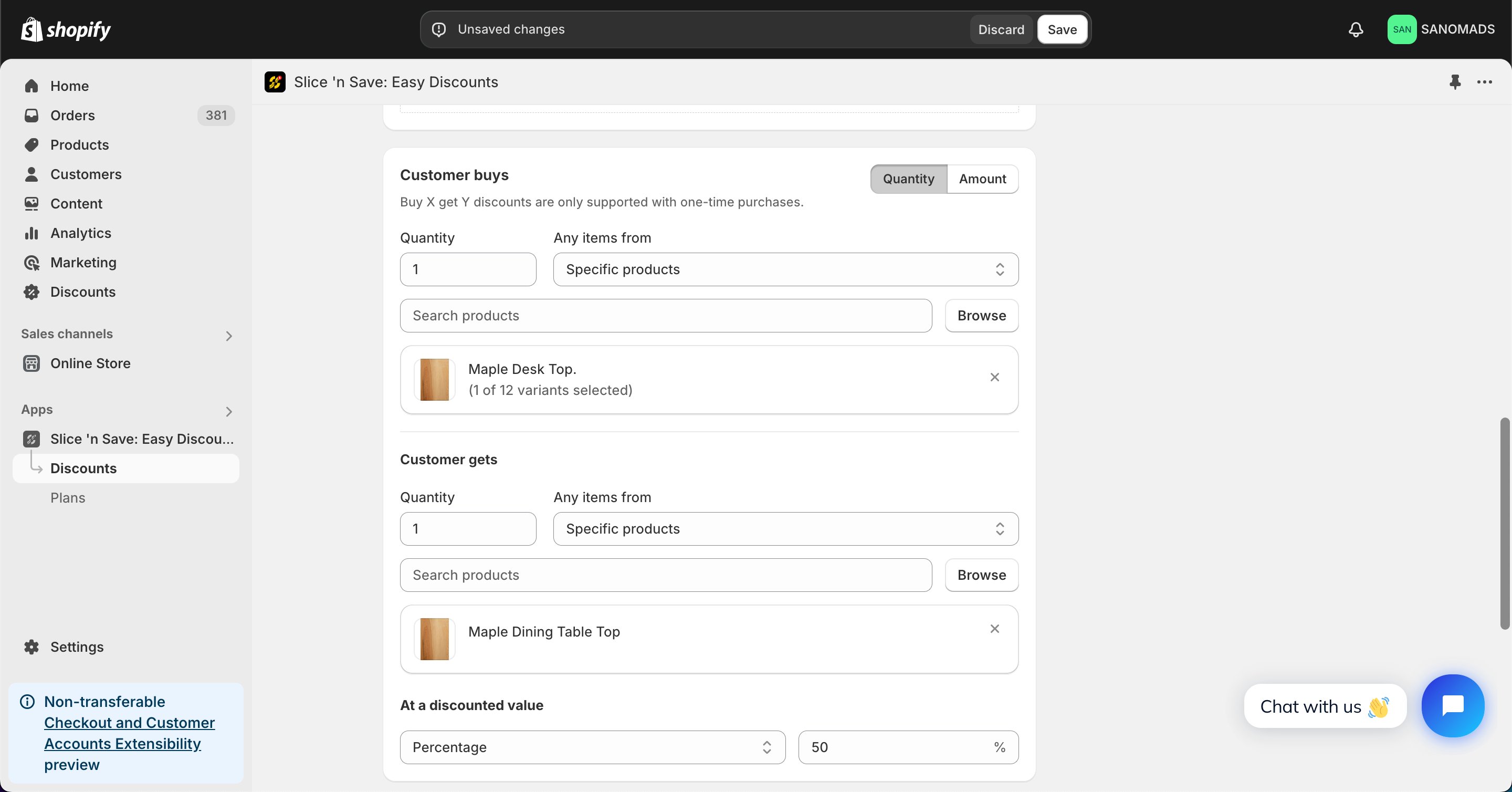
  <Step title="Set the &#x22;Buy&#x22; products and quantity">
    Select the products and quantities the customer must add to the cart to trigger the discount. Make sure all required products will be in the cart.
    <Frame>
      <img src="https://mintcdn.com/nomads-arc/TuRE4lj597elb6gw/images/fc5cdda055-e12ff67811dec30eea4a0ef10a50a1ba.png?fit=max&auto=format&n=TuRE4lj597elb6gw&q=85&s=f75a8733192a6080b83e024397cd2bc8" alt="Fc5cdda055 E12ff67811dec30eea4a0ef10a50a1ba" width="2880" height="1508" data-path="images/fc5cdda055-e12ff67811dec30eea4a0ef10a50a1ba.png" />
    </Frame>
  </Step>

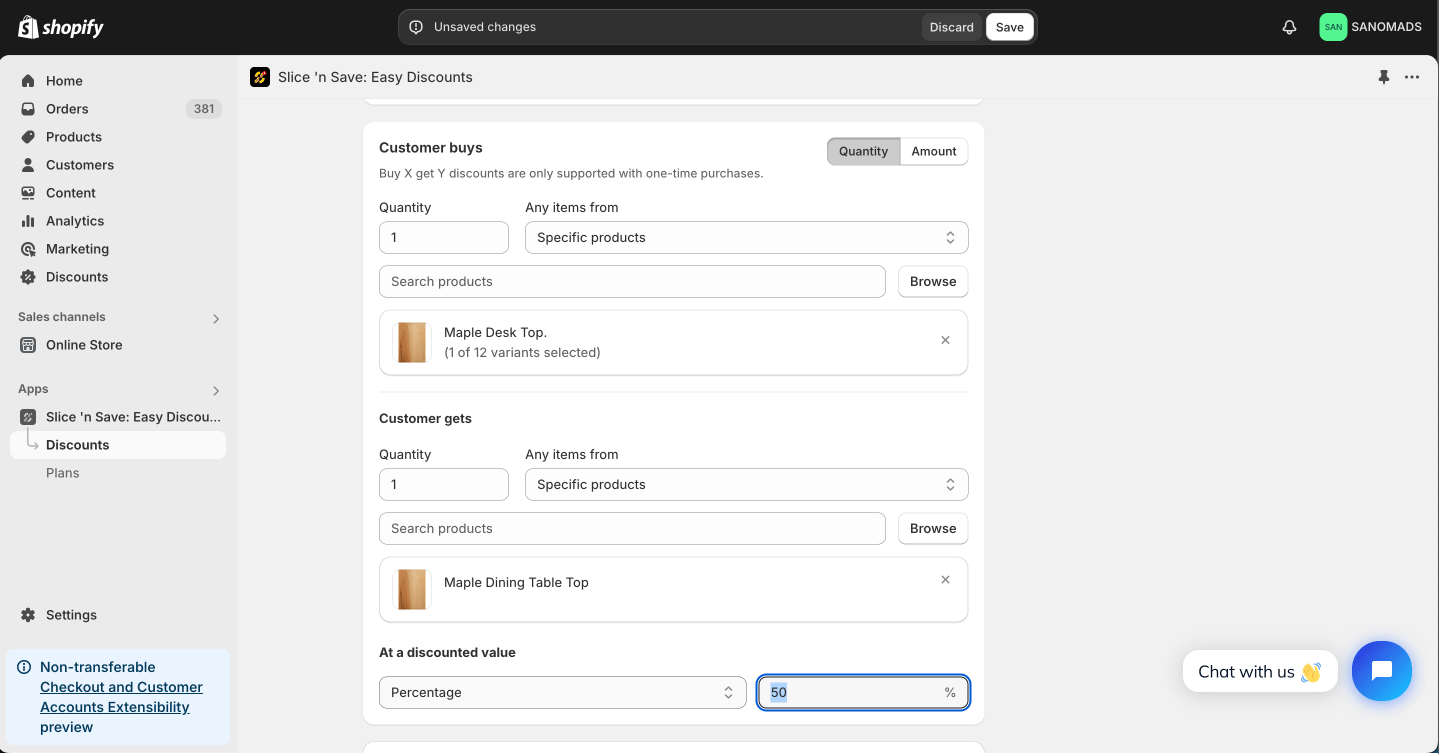
  <Step title="Set the discount type and value for &#x22;Get&#x22; products">
    Choose the discount type (percentage or fixed amount) and value that applies to the "get" products.
    <Frame>
      <img src="https://mintcdn.com/nomads-arc/TuRE4lj597elb6gw/images/e22a343638-69cc4863a4f654e33981ecbcaedbac7e.png?fit=max&auto=format&n=TuRE4lj597elb6gw&q=85&s=b9afb6ff1911b0e5de197956547045d2" alt="E22a343638 69cc4863a4f654e33981ecbcaedbac7e" width="1439" height="754" data-path="images/e22a343638-69cc4863a4f654e33981ecbcaedbac7e.png" />
    </Frame>
  </Step>

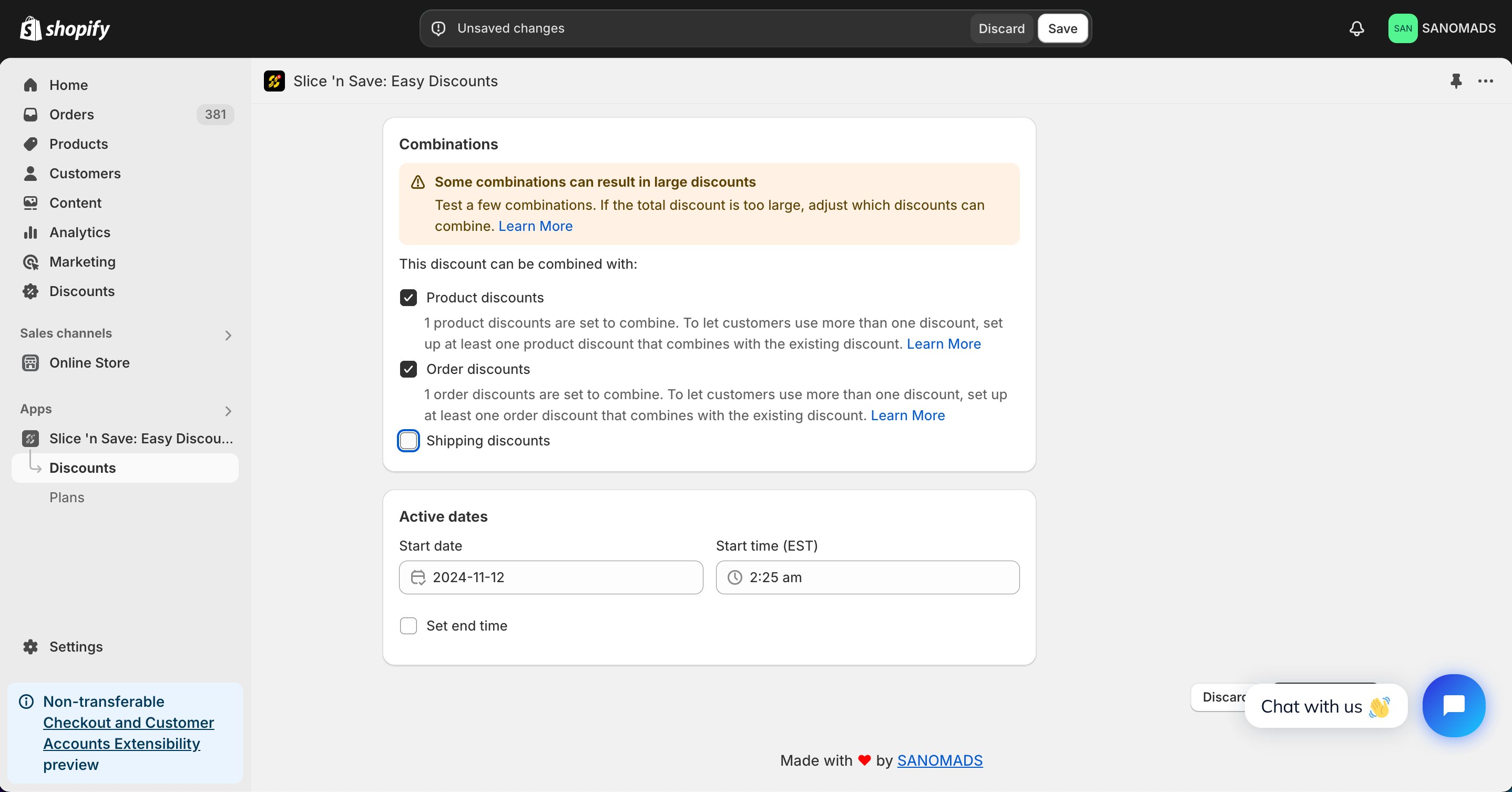
  <Step title="Set discount combinations">
    Choose whether this discount can combine with other Slice 'n Save discounts.
    <Frame>
      <img src="https://mintcdn.com/nomads-arc/ehuNxp9BmuOiiBty/images/55a10a53ae-582efb7f9817f1a0eb3356975faad75a-5.png?fit=max&auto=format&n=ehuNxp9BmuOiiBty&q=85&s=00ede988c17916e514322a4481ad9f28" alt="55a10a53ae 582efb7f9817f1a0eb3356975faad75a 5" width="2876" height="1506" data-path="images/55a10a53ae-582efb7f9817f1a0eb3356975faad75a-5.png" />
    </Frame>
  </Step>

  <Step title="Schedule the discount">
    To activate at a future date or time, update the active dates.

    <Frame>
      <img src="https://mintcdn.com/nomads-arc/TuRE4lj597elb6gw/images/55a10a53ae-582efb7f9817f1a0eb3356975faad75a-4.png?fit=max&auto=format&n=TuRE4lj597elb6gw&q=85&s=a6f65298d91dda839f6db61d80230cc1" alt="55a10a53ae 582efb7f9817f1a0eb3356975faad75a 4" width="2876" height="1506" data-path="images/55a10a53ae-582efb7f9817f1a0eb3356975faad75a-4.png" />
    </Frame>
  </Step>

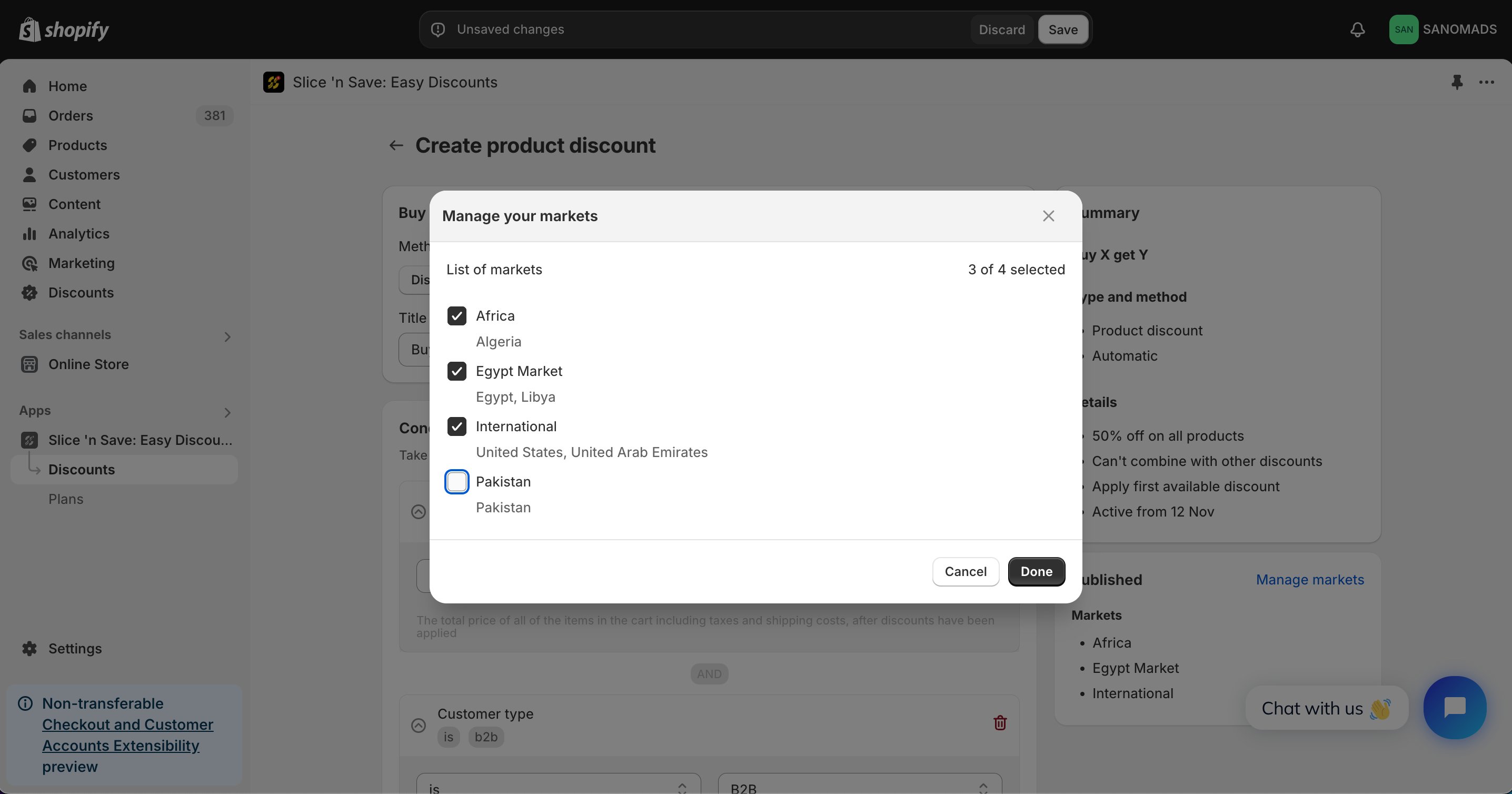
  <Step title="Manage markets">
    Adjust the markets from the **manage markets** section for discount eligibility.
    <Frame>
      <img src="https://mintcdn.com/nomads-arc/TuRE4lj597elb6gw/images/a246eb65cb-5392beb56a4fe92eb241e4ba708951f0.png?fit=max&auto=format&n=TuRE4lj597elb6gw&q=85&s=44cfa4164191f3d1c3030f9a67afb467" alt="A246eb65cb 5392beb56a4fe92eb241e4ba708951f0" width="2872" height="1508" data-path="images/a246eb65cb-5392beb56a4fe92eb241e4ba708951f0.png" />
    </Frame>
  </Step>

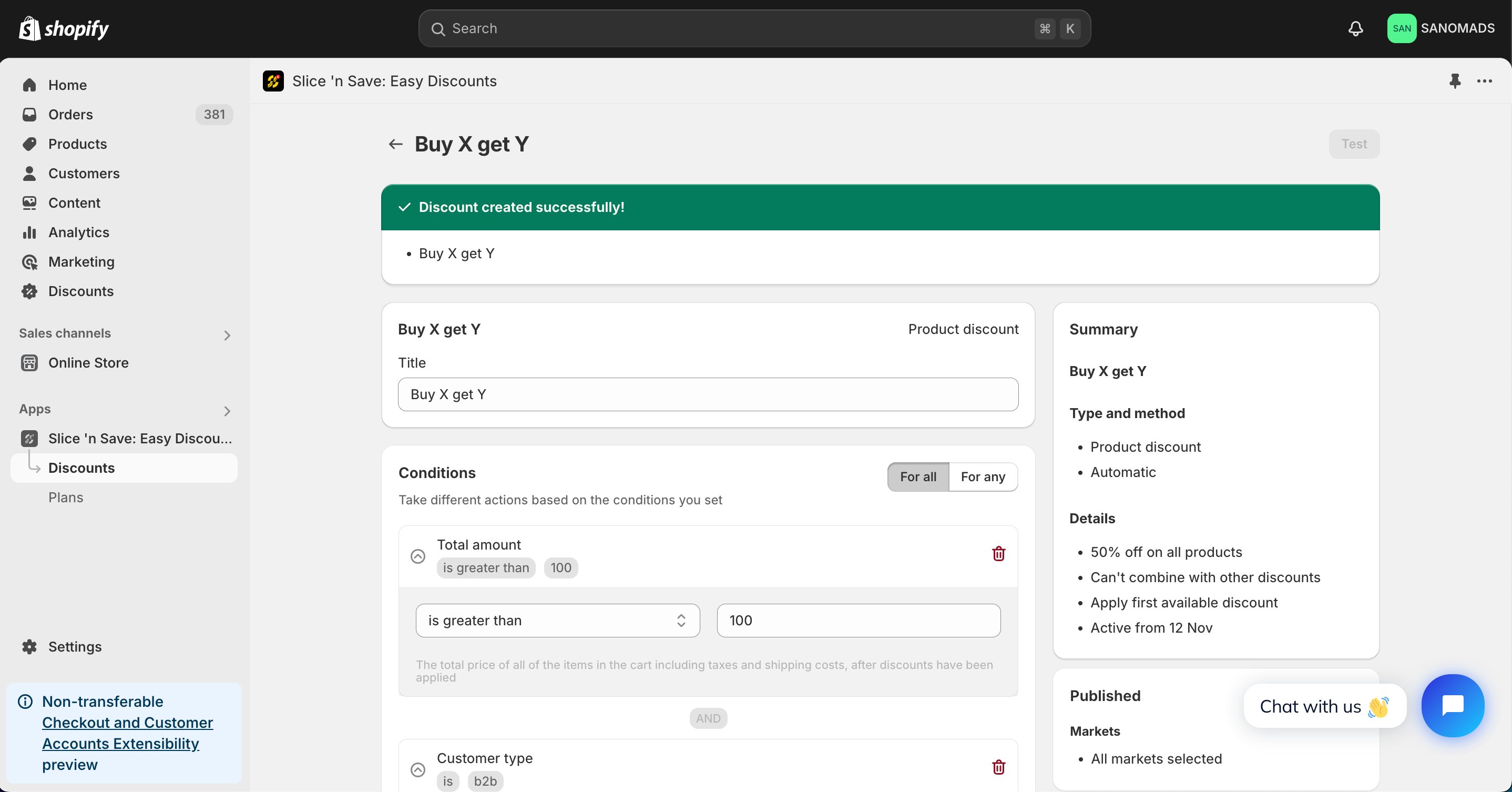
  <Step title="Save">
    Click **Save** to activate your discount.
    <Frame>
      <img src="https://mintcdn.com/nomads-arc/TuRE4lj597elb6gw/images/94a76b5d0d-d30ec208380223ba55c3b4027eb2da59.png?fit=max&auto=format&n=TuRE4lj597elb6gw&q=85&s=8a17fe06c38818bc7f1a80f3ec3063f3" alt="94a76b5d0d D30ec208380223ba55c3b4027eb2da59" width="2876" height="1506" data-path="images/94a76b5d0d-d30ec208380223ba55c3b4027eb2da59.png" />
    </Frame>
  </Step>
</Steps>

## Tips & Gotchas

<Note>
  All "Buy" products must be present in the cart for the BOGO discount to apply. If any required product is missing from the cart, the discount will not activate.
</Note>

<Tip>
  To apply 50% off all red T-shirts when customers buy both blue and red T-shirts: add both T-shirt variants to the "Buy" products list, set the "Get" product to the red T-shirt, and set the discount value to 50%.
</Tip>
